Live in Hindi · Starts Tuesday 10 November

The AI video editing course, taught live in Hindi.

One month. 16 live evening classes. You learn both skills an editor now needs: AI editing — clipping, rough cuts, captions, motion graphics from code — and AI generation, new shots no camera ever filmed. You end with a 60-second film in your portfolio.

₹4,999+ GSTLaunch price

You pay ₹5,899. From the next batch the course is ₹7,999 + GST.

Live classes, real Q&A, recordings for 90 days. No income promises.

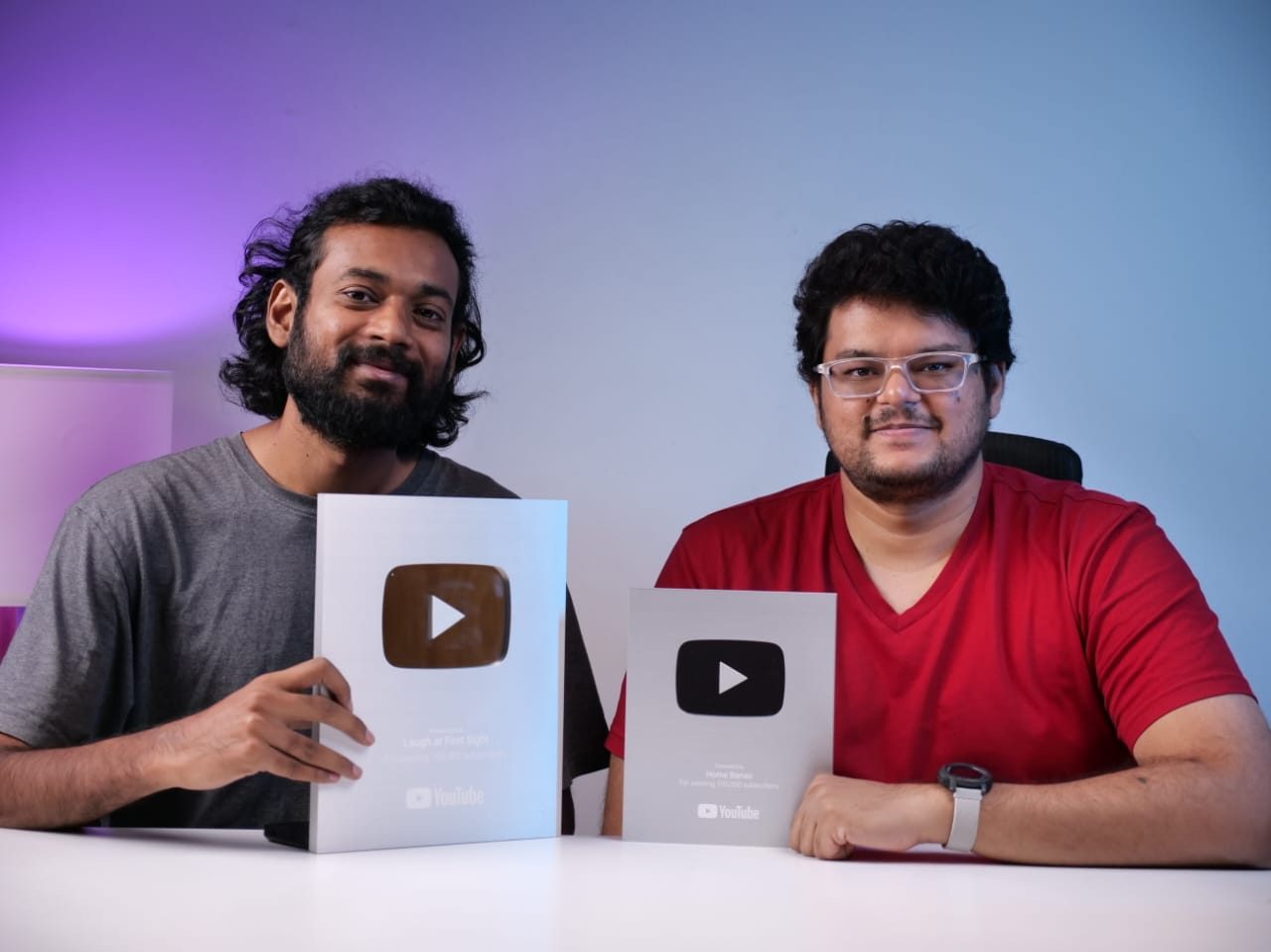
Nikhil Bhansali and Kishore T, Onewrk co-founders and your trainers, holding YouTube creator awards
Your trainersNikhil Bhansali & Kishore T
10 Nov – 7 DecOne month, 2026
Mon–Thu, 7–8 PMIST, weekday evenings
16 live classes16 hours, all in Hindi
25 seatsSo every question gets answered

Anyone can make a strange AI clip. Very few can deliver a video a client will pay for.

The tools are easy. The hard part is everything around them. That is what this month is about. Tools change every few weeks. The workflow does not. We teach the workflow, and use the tools that are best that month.

  • Long video into reels
  • Rough cuts and captions
  • Motion graphics from code
  • Same face in every frame
  • Staying legal
Samples

This is the standard we teach to

Made by the Onewrk team and published on our own channel, Shotless Studio, using the same six steps you will learn.

The method

One workflow, six steps, every class

Every class runs on the same six steps. We name the job first and the tool second, so when the tools change you keep the skill.

  1. 1

    Lock the idea

    Who it is for, the one thing to say, and the format.

  2. 2

    Write a shot list

    Shot by shot, not an essay.

  3. 3

    Plan each shot

    Framing, movement and length.

  4. 4

    Make the storyboard

    Image tools turn the plan into pictures. This is where a client says yes.

  5. 5The control point

    Set first and last frames

    Then prompt the motion. This is where you take control.

  6. 6

    Edit, sound, finish

    AI clips, rough-cuts and captions. You make the final cut, mix, label it as AI and deliver.

What you get

Everything you need to finish one real film

  • 16 live classes, 16 hours, taught in Hindi
  • Both skills: AI editing (long video to reels, rough cut, captions, motion graphics from code with HyperFrames) and AI generation
  • A recording of every class within 24 hours, yours for 90 days
  • Every template we use: shot list, prompt sheet, 40 camera words, generation log, client consent form
  • Homework checked after every class, with written feedback
  • A finished 45–60 second film for your portfolio
  • The marking sheet on day one, so you know how you are judged
  • A batch group for questions between classes
  • A certificate of completion
  • Clear the final review and you get a portfolio review and a place in our freelance pool

What a week looks like

  • Mon–ThuLive class, 7–8 PM IST
  • After classOne homework, about an hour
  • Fri–SunFree. Catch up, or polish your film

Built for people with a day job. Miss a class? The recording is up within 24 hours.

Class calendar

16 classes, 4 weeks, one finished film

Every class is 7:00–8:00 PM IST. Each homework builds a piece of your final film, so by the last week your film is mostly done.

Week 1 · Plan and picture

10 Nov – 16 Nov
  1. Tue10Nov

    Class 1The job, not the tool

    AI generation vs AI editing, what clients pay for, what AI is good and bad at, and the six steps.

  2. Wed11Nov

    Class 2Brief to shot list

    Turn a vague brief into a 12-shot plan with timing and intent.

  3. Thu12Nov

    Class 3Storyboard frames

    Use image tools to make frames that look like your final film.

  4. Mon16Nov

    Class 4Same face, same product

    Keep one person and one product the same in every frame.

Week 2 · AI generation: motion

17 Nov – 23 Nov
  1. Tue17Nov

    Class 5Prompts that control the shot

    Action, camera, lens, light and length — in camera words.

  2. Wed18Nov

    Class 6First frame, last frame

    Set the start and end yourself. The model only fills the middle.

  3. Thu19Nov

    Class 7Pick the right model

    Choose on quality, price and speed. Build your own cost sheet.

  4. Mon23Nov

    Class 8Fix what breaks

    Hands, jitter, text, physics. Re-prompt, re-frame, fix in the edit, or shoot it.

Week 3 · AI editing: clips, captions, motion graphics

24 Nov – 30 Nov
  1. Tue24Nov

    Class 9AI clipping: long video to reels

    Let AI find the best moments in a 1-hour podcast and cut 10 reels. You choose what stays.

  2. Wed25Nov

    Class 10AI rough cut and captions

    Remove the umms, ahhs and silences, and add Hindi and English captions. AI gives the rough cut; the final cut is yours.

  3. Thu26Nov

    Class 11Motion graphics from code

    Titles, lower thirds, animated text and charts with libraries like HyperFrames. Describe it in Hindi or English, AI writes the code, the code makes the video. No programming needed.

  4. Mon30Nov

    Class 12The edit: AI + real footage

    Pacing, cutting on motion, grain and colour, and mixing phone footage with AI shots so no one sees the join. In 16:9 and 9:16.

Week 4 · Voice, sound, finish and deliver

1 Dec – 7 Dec
  1. Tue1Dec

    Class 13Voice-over and lip-sync

    Hindi and English voice-over, when an AI presenter is the cheaper answer and when it is not, and the consent rules for voices.

  2. Wed2Dec

    Class 14Sound design and finishing

    Sound is the fastest way to stop AI from feeling fake. Then upscale, clean up, export for YouTube and Instagram, and make a thumbnail.

  3. Thu3Dec

    Class 15The law, in plain words

    AI labels, voice and face consent, music rights, and what the client signs.

  4. Sun6Dec

    Capstone due, 6 PM

    Upload your finished film and files. The weekend is yours to polish.

  5. Mon7Dec

    Class 16Capstone review

    Your film reviewed live against the marking sheet. Then: how to scope and price a job.

How you are judged

The marking sheet. You get it on day one.

Score 70 or more with a clean legal sheet → a portfolio review and a place in our freelance pool.

Who teaches you
Onewrk co-founders Nikhil Bhansali and Kishore T

Nikhil Bhansali and Kishore T

Onewrk’s two founders. Onewrk is a Bengaluru studio run by the two of us, and we hire editors for our own projects — so we know exactly which AI skills editors are missing. Both of us hold YouTube Silver Play Buttons. We have worked on YouTube channels like Heartfulness and Pot and Bloom, and we make AI films on our own channel, Shotless Studio — the samples on this page come from it.

About the freelance pool

When we need extra hands on a video project, we go to our pool first. Clear the marking sheet and we review your portfolio and add you. That is the whole promise.

We do not guarantee projects, income or a job. Anyone who promises you that is selling you something.
Tool cost

The real tool cost. Most courses do not tell you.

All you need
₹0

Free route

Enough for the whole course: Google Flow, Krea, Kling, Ideogram, DaVinci Resolve (free version), plus a free AI chat assistant to write motion-graphics code.

₹399/mo

Google AI Plus

More generations if you want more room to try things.

₹1,950/mo

Google AI Pro

The comfortable option for heavy users.

Google’s India prices as of October 2026. Check before you buy — tool prices change often. College student? Google is offering students 12 months of AI Plus free right now. Check if you qualify.

We do not teach CapCut. It is blocked in India, and its terms take rights over the footage you upload — including your client’s.

Is this for you?

Who it is for

For you if you are

  • A video editor who wants to add AI properly
  • A freelancer who wants better-paying work
  • A business owner who wants their editor trained (send them, or come along)
  • Someone who learns best in Hindi

Not for you if you want

  • “Faceless channel” passive income
  • 50 tool names in one weekend
  • Deepfakes of real people, or cloned voices of anyone but yourself
  • Bulk content spam

We teach one route deeply, and one backup for each job. Not twenty tools taught shallow.

Book your seat in the November batch

₹4,999 + 18% GST = ₹5,899. One payment. This is the launch price for the first batch. From the next batch the course is ₹7,999 + GST.

  • Secure payment by Zoho Payments. UPI, cards, net banking.
  • WhatsApp and email confirmation within 5 minutes. Your pre-work reaches you before the first class.
  • Booking closes Monday 9 November, 6 PM IST.
  • Refunds: cancel before the first class (Tue 10 Nov) for a full refund. After that, no refund — but you can move to the next batch once, free. Terms & refunds.
  • Companies buying 5 or more seats: email hello@onewrk.com. We run private team programs on your own footage instead.

What you walk away with

  • A finished 45–60 second film for your portfolio
  • Both skills: AI editing (clips, captions, motion graphics from code) and AI generation
  • 16 live hours in Hindi, plus recordings for 90 days
  • Every template: shot list, prompt sheets, generation log, consent form
  • Homework checked after every class
  • Score 70+ and you get a portfolio review
Onewrk co-founders Nikhil Bhansali and Kishore T

Taught live by Nikhil Bhansali and Kishore T. 25 seats in this batch.

November batch · Hindi

₹4,999+ GST

10 Nov – 7 Dec · Mon–Thu · 7–8 PM IST

You pay ₹5,899 today — ₹4,999 + 18% GST. Launch price for this batch only.

Or get a payment link on WhatsApp

Trouble paying? WhatsApp us at +91 96795 13231.

FAQ

Questions people ask

Is this AI editing or AI generation?

Both. Weeks 1–2 are AI generation: making new shots that were never filmed. Week 3 is AI editing on your own footage: finding the best moments in a long video and cutting reels, rough cuts, removing umms and silences, captions, and motion graphics made from code with libraries like HyperFrames. Week 4 is voice, sound and finishing. Most editors know one side. Clients now want both.

Do I need to know coding for the motion graphics class?

No. You describe the title, the animation and the colours in plain Hindi or English. AI writes the code, and the code makes the video. We show you how to ask for it, and how to fix it when it goes wrong.

Is the whole course in Hindi?

Yes. Every class is taught in Hindi. Tool names and camera words stay in English, because that is what the tools understand. You can ask questions in Hindi or English.

I work during the day. Can I keep up?

Classes are Monday to Thursday, 7–8 PM IST. Weekends are free for homework. If you miss a class, the recording is up within 24 hours.

What if I miss a class?

You get the recording within 24 hours and keep it for 90 days after the course ends. Homework deadlines stay the same.

Do I need a powerful computer?

No. The AI tools run in your browser. Any laptop from the last 5 years is fine. You do need a laptop or desktop — a phone alone is not enough.

Do I have to pay for AI tools?

No. You can finish the whole course on free tools. Paid plans (₹399 or ₹1,950 a month) are optional.

Is it really live?

Yes. Every class is taught live with real Q&A. The batch is capped at 25 so questions actually get answered.

Will you find me work?

No promise. Clear the marking sheet and you get a portfolio review and a place in our pool. That is real, and it is all we claim.

What do I get at the end?

A finished film, all the templates, the recordings, a certificate, and if you score 70+, a portfolio review.

Is there an English batch?

Not this time. The November batch is Hindi only. WhatsApp us if you want to hear about a future English batch.

Can I pay in parts?

Not right now. One payment.

Is this the same as your corporate training?

No. The corporate program is private, on your company’s footage, for 5 or more people. This is an open course for individuals.
WhatsApp now